My first attempt at adding enemies to the game involved creating a simple physics group which I spawn enemies from. Their position is updated every frame by getting the normalized directional vector to the player and then multiplying it by a movement speed variable which is added to their position. This results in them chasing the player around the game world until they collide, at which point they explode and deal a small amount of damage to the player.
Although this system creates the behaviour I am looking for it does have a problem – as the enemies are simply spawned from a physics group it doesn’t seem to be possible to give them individual properties, such as health. This is an issue because when it comes to incrementing the difficulty the only option is to spawn more enemies which, following a quick playtest, becomes difficult for even a powerful pc when there are 400+ enemies on the screen.
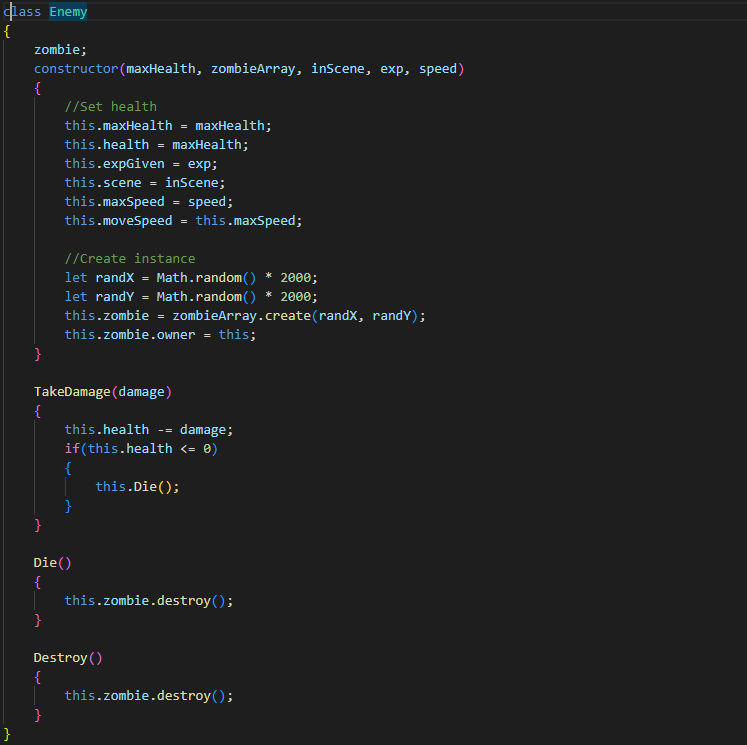
After receiving some advice on this I decided it would be best to create an Enemy class which had the physics body as a property. I could then create other properties, such as max health and speed, which would allow me to increase the difficulty without needing to add too many enemies to the screen at once. Here is a screenshot of the enemy class:
And this is the function which creates new enemies:
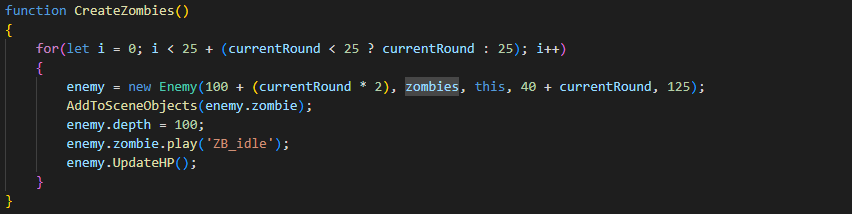
When creating enemies we simply pass in the existing physics group (zombies) and the Enemy class handles the rest inside the constructor, creating a new physics body and assigning it to itself as a property. We automatically handle the increasing of the difficulty by passing in a base health value with an additional amount based on the current round. As we assign the speed value in the constructor too we could do a similar thing here, maybe even adding a random range of values so all enemies move at different speeds.
So far everything is working with our enemies. However, now that they have a health property it would be good to have a visual representation of their remaining health on the screen. In these games a common solution is to have a small health bar above the head of the enemies. Initially I wanted to add this health bar as a direct property of the instantiated Enemy. This was made difficult by the scope in Phaser as I was unable to access the scene from within the Enemy class to actually draw the health bars.
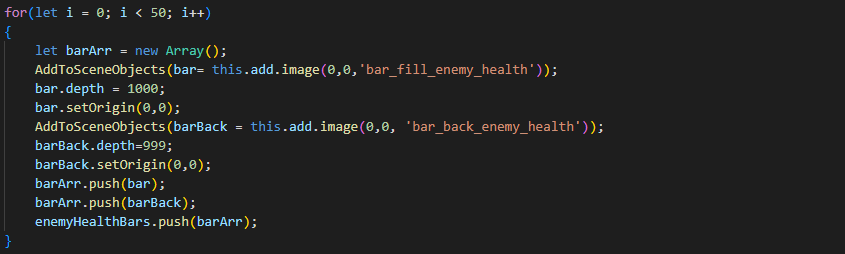
To get around this I decided it would be best to create a fixed amount of health bar objects in the Create() function. This amount is the same as the maximum number of enemies able to be alive at once. I will then loop through every Enemy instance and assign one of the health bar objects to their position, scaling the fill of the health bar to match the enemy’s current percentage of health remaining. This is the code which creates the health bars at the start:
The bars are assigned their position in a function which also moves the zombies. Doing this here means we can handle the movement of the zombie first and then instantly update the health bar to match. First, we must iterate through the health bar array and assign them a position off the screen. Then we iterate through the currently alive enemies and assign one of the health bars to its new position. This is all done using the following code:
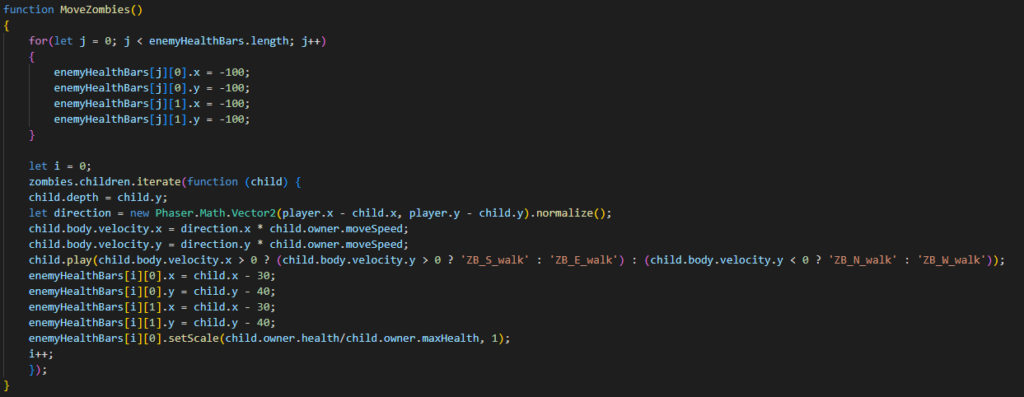
This is almost definitely not the most optimal method for health bars. I would prefer that the health bars were a property of the enemy class and didn’t have to be moved twice every frame. However, at this time this is the best method I’ve been able to figure out and it works so it will do for now.
Now that the enemies are added and they behave like I wanted them to it’s time to move on to the next step which is creating some menus for the game.
